TechInformer
Follow on Google
  • Latest
  • AI
  • Smartphones
  • Gadgets
  • Apps
  • Telecom
  • Startups
  • Security
  • Gaming
  • Reviews
  • How To
No Result
View All Result
  • Latest
  • AI
  • Smartphones
  • Gadgets
  • Apps
  • Telecom
  • Startups
  • Security
  • Gaming
  • Reviews
  • How To
No Result
View All Result
TechInformer
No Result
View All Result
Home Apps

How To Freeze Last Seen On WhatsApp

by TechInformer Desk
September 3, 2024
in Apps, How To
Reading Time: 2 mins read
A A
How To Use Dual WhatsApp Accounts On The Same Phone
2 min readAdd TechInformer as a preferred source on Google

WhatsApp has become a highly crucial part of all our lives. From professional to personal, every aspect of our day-to-day proceedings is dependent on this instant messaging app.

What started as a simple messaging service in 2009, has evolved into a means of communication like no other.

With the app, comes a lot of features and they just keep adding on to it to make it more user-friendly.

iOS 27 Update in India: Supported iPhones and New FeaturesAlso readiOS 27 Update in India: Supported iPhones and New Features

One such feature that has become the most talked about is the “Last Seen Freeze” on WhatsApp.

Earlier, people could see when someone was last active on the app or when someone was online. However, the developers have made it more interesting by toggling with the privacy option and making it easier for people to stay discreet while using the app.

What Is Freezing Last Seen?

Last Seen is a feature that lets your contacts know when you were last online and how frequently you are on the app by constantly updating your last seen timestamp.

For many it is useful but for some, it may become a hindrance. With the Last Seen freezing feature, one can permanently freeze their last seen on WhatsApp, saving some of you from an awkward conversation for your delayed response.

Turning on the feature will simply hide your last seen with no other change to the functioning of your app. You may use it just as usual but just with some privacy.

How To Freeze Last Seen On WhatsApp?

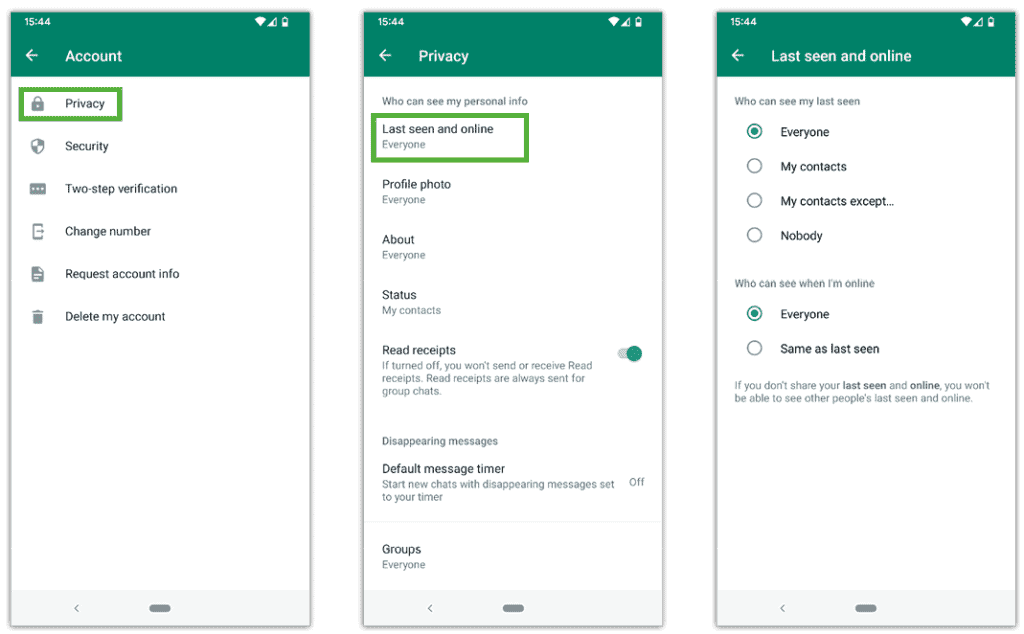
Follow the below-mentioned simple steps and you can hide your last seen on your Android Phone.

Step 1: Launch your WhatsApp on your device.

Step 2: Click on the three vertical dots and go to settings.

Step 3: Go to privacy settings.

Step 4: Click on “ Last seen and online” and change it to ‘Nobody’.
How To Freeze Last Seen On WhatsApp

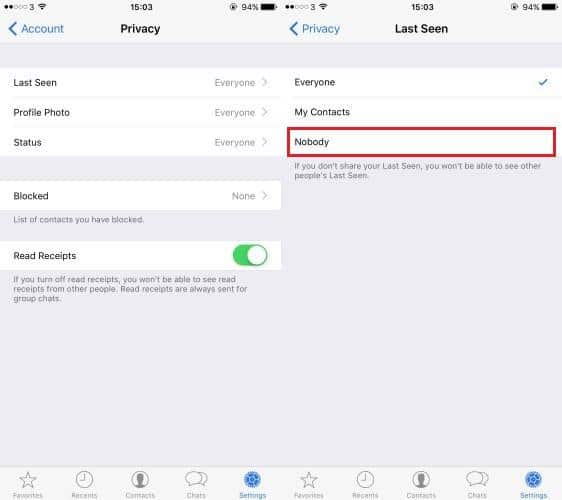
Steps to hide your last seen status on an iOS device.

Step 1: Launch your WhatsApp on your device.

Step 2: Tap on the ‘Settings’ mentioned in the below right corner

Step 3: Go to accounts followed by privacy settings.

Step 4: Click “Last seen” and change it to ‘Nobody’.
How To Freeze Last Seen On WhatsApp

Modifying your last seen visibility to ‘nobody’ will freeze your last seen from your contacts. You can also hide your last seen status for a specific contact. Just follow the first three steps, select “My Contacts Except…” and choose the contact or contacts from whom you wish to hide your active status.

Also Check: 5 Ways To Prevent Your SmartPhone From Overheating In Summer

Found this useful?

Share it with your friends

See more TechInformer stories on Google

Add us as a preferred source and our stories will show up more often in your Top Stories.

Add TechInformer as a preferred source on Google


WhatsAppLinkedInXFacebookEmail

Related Posts

Aadhaar card held next to a smartphone
How To

How To Update Aadhaar Email And Mobile In The New App

October 13, 2026
An iPhone showing the home screen, illustrating the iOS 27 update
Apps

iOS 27 Update in India: Supported iPhones and New Features

October 13, 2026
OnePlus Android 16 Beta 2 Update Reportedly Adds Custom Battery Charging Limit Feature
Smartphones

OnePlus Android 16 Beta 2 Update Reportedly Adds Custom Battery Charging Limit Feature

April 14, 2025
Apple Rolls Out iOS 18.4 Update, Bringing Apple Intelligence Features To India
AI

Apple Rolls Out iOS 18.4 Update, Bringing Apple Intelligence Features To India

April 2, 2025
Apple’s Foldable iPhone May Offer iPad-Like Display Aspect Ratio & Support iPad Apps, Tipster Says
Smartphones

Apple’s Foldable iPhone May Offer iPad-Like Display Aspect Ratio & Support iPad Apps, Tipster Says

April 2, 2025
Apple To Host Worldwide Developers Conference 2025 From June 9
Apps

Apple To Host Worldwide Developers Conference 2025 From June 9

March 26, 2025
Next Post
How To Use Dual WhatsApp Accounts On The Same Phone

How To Use Dual WhatsApp Accounts On The Same Phone

Popular

Instagram Confirms Video Quality Drops For Less Viewed Content

Instagram Confirms Video Quality Drops For Less Viewed Content

October 28, 2024
iPhone 16e Now Available For Purchase In India: Price, Offers & More

iPhone 16e Now Available For Purchase In India: Price, Offers & More

February 28, 2025
Google Widely Rolls Out 'Pixel Watch Fully Charged' Notification Feature

Google Widely Rolls Out ‘Pixel Watch Fully Charged’ Notification Feature

October 8, 2024
HP Introduces Omen 16 Slim Gaming Laptop With Nvidia GeForce RTX 5070 GPU & Refreshed Omen Transcend 14

HP Introduces Omen 16 Slim Gaming Laptop With Nvidia GeForce RTX 5070 GPU & Refreshed Omen Transcend 14

March 20, 2025
OpenAI Rolls Out ChatGPT Search Feature For Everyone, No Signup Needed

OpenAI Rolls Out ChatGPT Search Feature For Everyone, No Signup Needed

February 7, 2025
Red Dead Redemption And Undead Nightmare All Set To Launch On PC In October

Red Dead Redemption And Undead Nightmare All Set To Launch On PC In October

October 9, 2024
Facebook Instagram Twitter LinkedIn Youtube

About Tech Informer

Focused on keeping new-age audiences informed about the ever-evolving world of technology, Tech Informer is the one-stop destination if you enjoy reading about the ongoing developments in the Tech world.

Navigation

  • Latest
  • AI
  • Smartphones
  • Gadgets
  • Apps
  • Telecom
  • Startups
  • Security
  • Gaming
  • Reviews
  • How To

Information

  • About Us
  • Contact Us
  • Privacy Policy

©2026 Copyright Tech Informer. RVCJ Digital Media Pvt Ltd

TechInformer

Tech news, smartphones, AI and gadgets in India, explained simply.

Topics

  • Latest
  • AI
  • Smartphones
  • Gadgets
  • Apps
  • Telecom
  • Startups
  • Security
  • Gaming
  • Reviews
  • How To

Company

  • About us
  • Contact us
  • Privacy policy
  • Advertise with us

Follow us on Google

Add TechInformer as a preferred source and see our stories more often in Top Stories.

Add as preferred source

© 2026 Tech Informer. RVCJ Digital Media Pvt Ltd.

Latest news · Sitemap

TECHINFORMER
No Result
View All Result
  • Latest
  • AI
  • Smartphones
  • Gadgets
  • Apps
  • Telecom
  • Startups
  • Security
  • Gaming
  • Reviews
  • How To

©2026 Copyright Tech Informer. RVCJ Digital Media Pvt Ltd