TechInformer
Follow on Google
  • Latest
  • AI
  • Smartphones
  • Gadgets
  • Apps
  • Telecom
  • Startups
  • Security
  • Gaming
  • Reviews
  • How To
No Result
View All Result
  • Latest
  • AI
  • Smartphones
  • Gadgets
  • Apps
  • Telecom
  • Startups
  • Security
  • Gaming
  • Reviews
  • How To
No Result
View All Result
TechInformer
No Result
View All Result
Home Security

Forgot Your IRCTC Password? Here Is How To Reset Your Account Password Online

by TechInformer Desk
September 4, 2024
in Security
Reading Time: 2 mins read
A A
Forgot Your IRCTC Password? Here Is How To Reset Your Account Password Online
2 min readAdd TechInformer as a preferred source on Google

The Indian Railway Catering and Tourism Corporation (IRCTC) website has become very user friendly enabling anyone and everyone to book or cancel their tickets online.

Users who have their IRCTC login credentials have been making the most of the services available. The Ministry of Railways has been working hard to ensure that the people use the portal with ease. You may now even book your tickets through a third party app like MakeMyTrip, Ixigo and others.

But it so happens that sometimes you Forgot Your IRCTC Password, the people who are not very frequent users of the portal may forget their password, making it difficult to use.

Fake APK Scam on WhatsApp: How to Stay Safe and Report ItAlso readFake APK Scam on WhatsApp: How to Stay Safe and Report It

Forgot Your IRCTC Password? Here Is How To Reset Your Account Password Online

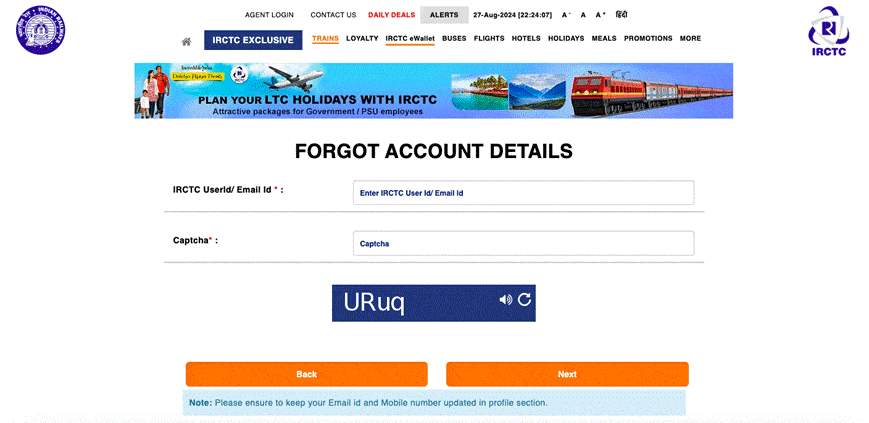
To help you with this issue, IRCTC assists you in retrieving and resetting your password.


  • Visit the official IRCTC Website.
  • Click on Login and then on ‘Forgot Account Details’.
  • You will be prompted to enter your username / email ID. Type it in and proceed to the next step.
  • The next page will ask for the security question set up during the account set up. Fill in the answers correctly.
  • You will then receive a link on the registered email ID for resetting the password.
  • Use the link to reset your password and do not forget to set up a strong password for added safety and security


It is very important that you keep your mobile number and email ID updated in the profile section as not having access to these will make the process difficult and tiresome.

If you are unable to reset your password or are facing some technical issue, you can always call on the dedicated IRCTC customer care number and they will assist you in making the changes with ease.

Found this useful?

Share it with your friends

See more TechInformer stories on Google

Add us as a preferred source and our stories will show up more often in your Top Stories.

Add TechInformer as a preferred source on Google
WhatsAppLinkedInXFacebookEmail

Related Posts

A person using an Android smartphone, illustrating fake APK fraud in India
Security

Fake APK Scam on WhatsApp: How to Stay Safe and Report It

October 13, 2026
An iPhone showing the home screen, illustrating the iOS 27 update
Security

Apple Rolls Out Security Updates For iOS 18, iPadOS 18 & macOS Sequoia

March 12, 2025
Cybersecurity Firm Wiz Discovers Exposed DeepSeek Data, Including Sensitive Logs
Security

Cybersecurity Firm Wiz Discovers Exposed DeepSeek Data, Including Sensitive Logs

January 30, 2025
Government Launches ‘Sanchar Saathi Mobile App’ To Strengthen Telecom Security & Empower Citizens
Security

Government Launches ‘Sanchar Saathi Mobile App’ To Strengthen Telecom Security & Empower Citizens

January 20, 2025
How To Recover Your Gmail Password Without Phone Number & Recovery Email
Security

How To Recover Your Gmail Password Without Phone Number & Recovery Email

November 18, 2024
Scammers Use AI To Target Gmail Users: How To Stay Protected
Security

Scammers Use AI To Target Gmail Users: How To Stay Protected

October 14, 2024
Next Post
How To Delete Your Facebook Account Permanently

How To Delete Your Facebook Account Permanently

Popular

WhatsApp Introduces New Feature Allowing Users To Scan Documents Directly Using Camera

WhatsApp Introduces New Feature Allowing Users To Scan Documents Directly Using Camera

December 30, 2024
Realme 14x 5G Soon To Launch In India: Everything You Need To Know!

Realme 14x 5G Soon To Launch In India: Everything You Need To Know!

December 10, 2024
Apple TV 4K streaming box with Siri Remote (earlier model shown)

Apple TV 4K (2026) Launched: India Price Rs 39,900, A19, Siri AI

October 13, 2026
Oppo Launches A3x 4G In India: Key Specs, Availability, And More

Oppo Launches A3x 4G In India: Key Specs, Availability, And More

October 28, 2024
Xiaomi Introduces Redmi Note 14 Series, Sound Outdoor Speaker & Redmi Buds 6: Check Out The Details!

Xiaomi Introduces Redmi Note 14 Series, Sound Outdoor Speaker & Redmi Buds 6: Check Out The Details!

December 9, 2024
OPPO Reno 13 Series: Specs, Chipset & Color Options Confirmed Ahead Of November 25 Launch

OPPO Reno 13 Series: Specs, Chipset & Color Options Confirmed Ahead Of November 25 Launch

November 25, 2024
Facebook Instagram Twitter LinkedIn Youtube

About Tech Informer

Focused on keeping new-age audiences informed about the ever-evolving world of technology, Tech Informer is the one-stop destination if you enjoy reading about the ongoing developments in the Tech world.

Navigation

  • Latest
  • AI
  • Smartphones
  • Gadgets
  • Apps
  • Telecom
  • Startups
  • Security
  • Gaming
  • Reviews
  • How To

Information

  • About Us
  • Contact Us
  • Privacy Policy

©2026 Copyright Tech Informer. RVCJ Digital Media Pvt Ltd

TechInformer

Tech news, smartphones, AI and gadgets in India, explained simply.

Topics

  • Latest
  • AI
  • Smartphones
  • Gadgets
  • Apps
  • Telecom
  • Startups
  • Security
  • Gaming
  • Reviews
  • How To

Company

  • About us
  • Contact us
  • Privacy policy
  • Advertise with us

Follow us on Google

Add TechInformer as a preferred source and see our stories more often in Top Stories.

Add as preferred source

© 2026 Tech Informer. RVCJ Digital Media Pvt Ltd.

Latest news · Sitemap

TECHINFORMER
No Result
View All Result
  • Latest
  • AI
  • Smartphones
  • Gadgets
  • Apps
  • Telecom
  • Startups
  • Security
  • Gaming
  • Reviews
  • How To

©2026 Copyright Tech Informer. RVCJ Digital Media Pvt Ltd