TechInformer
Follow on Google
  • Latest
  • AI
  • Smartphones
  • Gadgets
  • Apps
  • Telecom
  • Startups
  • Security
  • Gaming
  • Reviews
  • How To
No Result
View All Result
  • Latest
  • AI
  • Smartphones
  • Gadgets
  • Apps
  • Telecom
  • Startups
  • Security
  • Gaming
  • Reviews
  • How To
No Result
View All Result
TechInformer
No Result
View All Result
Home Apps

How To Delete Your Facebook Account Permanently

by TechInformer Desk
September 4, 2024
in Apps
Reading Time: 2 mins read
A A
How To Delete Your Facebook Account Permanently
2 min readAdd TechInformer as a preferred source on Google

Social media platforms are deeply rooted in our day to day lives today. We are highly dependent on these apps for almost everything. From staying connected with our loved ones remotely to staying up to date with the latest trends, Facebook has had numerous uses over the years.

But these platforms have their pros and cons. And the biggest drawback that we have been seeing in the recent years is that people are getting addicted to these social media apps making it impossible for some to concentrate on their daily tasks.

This has led to a popular need for social media detox. Many people have been taking a break by either deactivating or permanently deleting their Facebook account.

WhatsApp account hacked? How to recover and report it in IndiaAlso readWhatsApp account hacked? How to recover and report it in India
How To Delete Your Facebook Account Permanently

By following some simple steps you can easily delete your Facebook account and get that much needed break online.

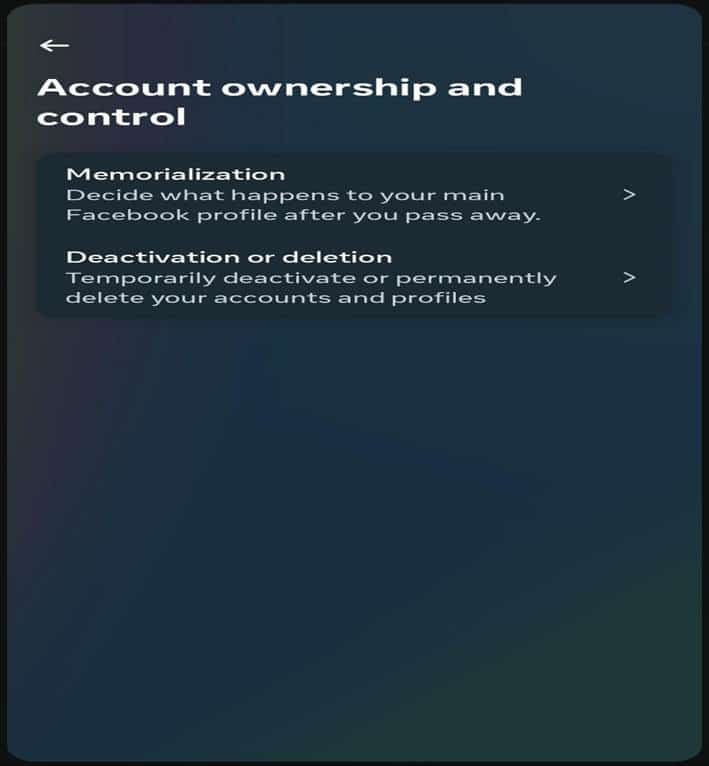
Delete your Facebook account through Accounts Centre


You can delete your account by going directly to the Accounts ownership and control settings in the Accounts Centre. Or you can follow these instructions:

  • On the Profile page tap the three horizontal lines in the top right of Facebook.
  • Scroll down to Settings and privacy.
  • Tap on the Accounts Centre and go to Personal details.
  • Tap Account ownership and control.
  • Tap Deactivation or deletion.
  • Choose the account or profile that you want to delete.
  • Tap Delete account.
  • Tap Continue, then follow the instructions to confirm.


Deleting your facebook account is not just useful for those looking for detox. There have been many cases where someone’s account has been hacked or their smartphone stolen. In order to keep their Facebook data private, people have opted to delete their account remotely. The same steps can be taken to temporarily deactivate your account.

Found this useful?

Share it with your friends

See more TechInformer stories on Google

Add us as a preferred source and our stories will show up more often in your Top Stories.

Add TechInformer as a preferred source on Google


WhatsAppLinkedInXFacebookEmail
Tags: Delete Facebook AccountDelete Your Facebook AccountFacebook

Related Posts

WhatsApp app icon on a smartphone screen
How To

WhatsApp account hacked? How to recover and report it in India

November 15, 2026
Amazon Echo Plus smart speaker on a table
News

Alexa for Shopping launches in India: features and how to use

November 15, 2026
An iPhone showing the home screen, illustrating the iOS 27 update
Apps

iOS 27 Update in India: Supported iPhones and New Features

October 13, 2026
OnePlus Android 16 Beta 2 Update Reportedly Adds Custom Battery Charging Limit Feature
Smartphones

OnePlus Android 16 Beta 2 Update Reportedly Adds Custom Battery Charging Limit Feature

April 14, 2025
Apple Rolls Out iOS 18.4 Update, Bringing Apple Intelligence Features To India
AI

Apple Rolls Out iOS 18.4 Update, Bringing Apple Intelligence Features To India

April 2, 2025
Apple’s Foldable iPhone May Offer iPad-Like Display Aspect Ratio & Support iPad Apps, Tipster Says
Smartphones

Apple’s Foldable iPhone May Offer iPad-Like Display Aspect Ratio & Support iPad Apps, Tipster Says

April 2, 2025
Next Post
How to Create a YouTube Channel in 2024

How to Create a YouTube Channel in 2024

Popular

Samsung Galaxy S25 Series Expected To Feature Free Gemini Advanced Subscription

Samsung Galaxy S25 Series Expected To Feature Free Gemini Advanced Subscription

December 31, 2024
ChatGPT app on a smartphone screen

ChatGPT Go Free Offer Ending in India: What to Do Now

October 13, 2026
Apple To Unveil Latest Products Next Week: M4 MacBook Pro, M4 iMac & More

Apple To Unveil Latest Products Next Week: M4 MacBook Pro, M4 iMac & More

October 25, 2024
Anime RNG TD Codes: Unlock Free Luck Potions, Money Potions & Crystals!

Anime RNG TD Codes: Unlock Free Luck Potions, Money Potions & Crystals!

December 10, 2024
Realme 14 5G Is Set To Launch In The Global Markets Soon: Color Option & Key Features Leaked

Realme 14 5G Is Set To Launch In The Global Markets Soon: Color Option & Key Features Leaked

March 7, 2025
Apple Is Working On A Dedicated App Store For Games: Report

Apple Is Working On A Dedicated App Store For Games: Report

October 23, 2024
Facebook Instagram Twitter LinkedIn Youtube

About Tech Informer

Focused on keeping new-age audiences informed about the ever-evolving world of technology, Tech Informer is the one-stop destination if you enjoy reading about the ongoing developments in the Tech world.

Navigation

  • Latest
  • AI
  • Smartphones
  • Gadgets
  • Apps
  • Telecom
  • Startups
  • Security
  • Gaming
  • Reviews
  • How To

Information

  • About Us
  • Contact Us
  • Privacy Policy

©2026 Copyright Tech Informer. RVCJ Digital Media Pvt Ltd

TechInformer

Tech news, smartphones, AI and gadgets in India, explained simply.

Topics

  • Latest
  • AI
  • Smartphones
  • Gadgets
  • Apps
  • Telecom
  • Startups
  • Security
  • Gaming
  • Reviews
  • How To

Company

  • About us
  • Contact us
  • Privacy policy
  • Advertise with us

Follow us on Google

Add TechInformer as a preferred source and see our stories more often in Top Stories.

Add as preferred source

© 2026 Tech Informer. RVCJ Digital Media Pvt Ltd.

Latest news · Sitemap

TECHINFORMER
As an Amazon Associate, we earn from qualifying purchases.
No Result
View All Result
  • Latest
  • AI
  • Smartphones
  • Gadgets
  • Apps
  • Telecom
  • Startups
  • Security
  • Gaming
  • Reviews
  • How To

©2026 Copyright Tech Informer. RVCJ Digital Media Pvt Ltd