TechInformer
Follow on Google
  • Latest
  • AI
  • Smartphones
  • Gadgets
  • Apps
  • Telecom
  • Startups
  • Security
  • Gaming
  • Reviews
  • How To
No Result
View All Result
  • Latest
  • AI
  • Smartphones
  • Gadgets
  • Apps
  • Telecom
  • Startups
  • Security
  • Gaming
  • Reviews
  • How To
No Result
View All Result
TechInformer
No Result
View All Result
Home Smartphones

Lost Your Android Phone? Here Is What To Do To Secure Your Sensitive Data

by TechInformer Desk
September 3, 2024
in Smartphones, Apps, Tech
Reading Time: 2 mins read
A A
Lost Your Android Phone? Here Is What To Do To Secure Your Sensitive Data
2 min readAdd TechInformer as a preferred source on Google

Have you ever lost your Android phone? Losing one’s smartphone is not a happy feeling for sure. A loss of a smartphone can entail so much more than just a loss of money. This small handheld device can contain priceless data from our pictures, logins, notes, our contacts as well as our banking credentials.

It has been a task to retrieve your lost smartphone for many and becomes taxing at times.

However many smartphones have now addressed this issue and have made it easier for us to secure our sensitive data on our smartphones.

Vivo X500 India Price: Two Leaks, Two AnswersAlso readVivo X500 India Price: Two Leaks, Two Answers

By following some simple steps on your Android smartphone, you can easily secure your data as well as retrieve your lost gadget.
Lost Your Android Phone? Here Is What To Do To Secure Your Sensitive Data

Lost Your Android Phone? This Is How You Secure Its Data:

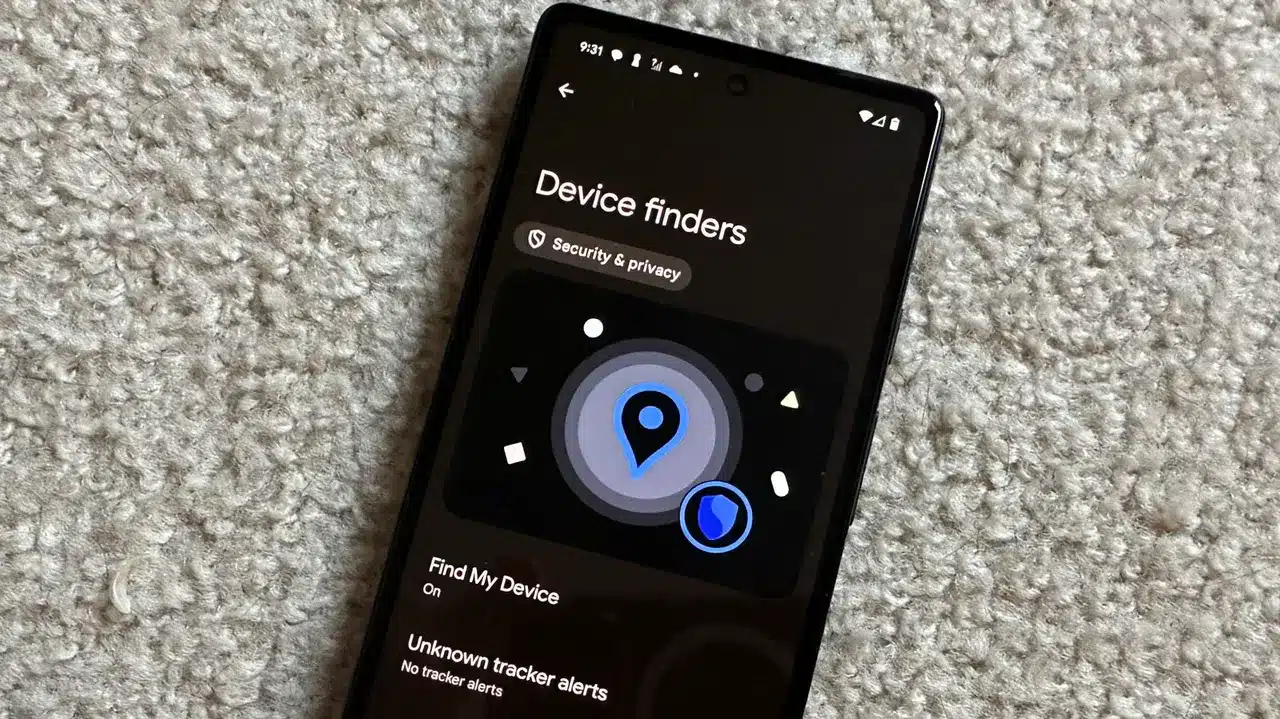
Find My Device

By using this feature, you can not only locate your lost device but also remotely erase your data from the lost smartphone. Make sure to turn it on. Here are some simple steps to turn on this feature.

  • Go To Settings
  • Scroll down and click on Google
  • Click on Find My device
  • Use the toggle to turn on ‘Use Find My Device’ 

Once switched on, you can locate your lost device through another device on the Find My Device App or through Find My Device Web. You will find many of your gadgets linked like your headphones, watch, and others. Choose your smartphone that has been lost.
Lost Your Android Phone? Here Is What To Do To Secure Your Sensitive Data

However, this feature is only useful if your device’s network is on. In case a phone is switched off you will only be able to see the last active location.

Through the app or web browser, you can choose various options like play sound to locate the phone if it is nearby.

But if the phone is stolen for good, all that is left to do is secure your data. Through Find My Device, you can remotely erase your sensitive data from the selected handset. Or you may even reset your smartphone’s password so that no one can have access to the data.

To ensure that you make the most of the feature at the time of need, make sure to regularly backup your photos and data on your Google Drive.

Also Check: 5 Emergency Features In Android Phone You Should Know About

Found this useful?

Share it with your friends

See more TechInformer stories on Google

Add us as a preferred source and our stories will show up more often in your Top Stories.

Add TechInformer as a preferred source on Google


WhatsAppLinkedInXFacebookEmail

Related Posts

Display over other apps permission screen on an Android phone
How To

Display Over Other Apps: How to Check It and Stop UPI Fraud

November 23, 2026
Vivo X500 series smartphone
News

Vivo X500 India Price: Two Leaks, Two Answers

November 23, 2026
Best phones under Rs 40000 in India
Buying Guides

Best Phones Under Rs 40,000 in India (November 2026)

November 21, 2026
Front view of a Redmi 15C smartphone
News

Redmi 15C 5G Drops to Rs 16,999 on Amazon India

November 21, 2026
A person photographing with a smartphone
Buying Guides

Best Phones Under Rs 25,000 in India (November 2026)

November 20, 2026
Samsung Galaxy M12, an earlier budget phone from the Galaxy M series
Buying Guides

Best Phones Under Rs 10,000 in India (November 2026)

November 18, 2026
Next Post
How To Make UPI Payment Without Internet

How To Make UPI Payment Without Internet

Popular

Samsung Teases Extended Reality Headset and Smart Glasses At Galaxy Unpacked 2025

Samsung Teases Extended Reality Headset and Smart Glasses At Galaxy Unpacked 2025

January 24, 2025
Xiaomi To Launch Redmi Note 14 5G Series Next Month In India

Xiaomi To Launch Redmi Note 14 5G Series Next Month In India

November 21, 2024
How To Create A Group Chat On Instagram

How To Create A Group Chat On Instagram

November 28, 2024
Indian Railways To Launch 'Super App' To Streamline Services On A Single Platform

Indian Railways To Launch ‘Super App’ To Streamline Services On A Single Platform

November 5, 2024
OneXSugar, Ayaneo Pocket S2 & Ayaneo Gaming Pad Introduce At GDC 2025

OneXSugar, Ayaneo Pocket S2 & Ayaneo Gaming Pad Introduced At GDC 2025

March 20, 2025
how to check SIM cards in your name: a selection of mobile SIM cards

How to Check How Many SIM Cards Are in Your Name

October 27, 2026
Facebook Instagram Twitter LinkedIn Youtube

About Tech Informer

Focused on keeping new-age audiences informed about the ever-evolving world of technology, Tech Informer is the one-stop destination if you enjoy reading about the ongoing developments in the Tech world.

Navigation

  • Latest
  • AI
  • Smartphones
  • Gadgets
  • Apps
  • Telecom
  • Startups
  • Security
  • Gaming
  • Reviews
  • How To

Information

  • About Us
  • Contact Us
  • Privacy Policy

©2026 Copyright Tech Informer. RVCJ Digital Media Pvt Ltd

TechInformer

Tech news, smartphones, AI and gadgets in India, explained simply.

Topics

  • Latest
  • AI
  • Smartphones
  • Gadgets
  • Apps
  • Telecom
  • Startups
  • Security
  • Gaming
  • Reviews
  • How To

Company

  • About us
  • Contact us
  • Privacy policy
  • Advertise with us

Follow us on Google

Add TechInformer as a preferred source and see our stories more often in Top Stories.

Add as preferred source

© 2026 Tech Informer. RVCJ Digital Media Pvt Ltd.

Latest news · Sitemap

TECHINFORMER
As an Amazon Associate, we earn from qualifying purchases.
No Result
View All Result
  • Latest
  • AI
  • Smartphones
  • Gadgets
  • Apps
  • Telecom
  • Startups
  • Security
  • Gaming
  • Reviews
  • How To

©2026 Copyright Tech Informer. RVCJ Digital Media Pvt Ltd