TechInformer
Follow on Google
  • Latest
  • AI
  • Smartphones
  • Gadgets
  • Apps
  • Telecom
  • Startups
  • Security
  • Gaming
  • Reviews
  • How To
No Result
View All Result
  • Latest
  • AI
  • Smartphones
  • Gadgets
  • Apps
  • Telecom
  • Startups
  • Security
  • Gaming
  • Reviews
  • How To
No Result
View All Result
TechInformer
No Result
View All Result
Home Apps

How to Permanently Delete or Deactivate Your Instagram Account

by TechInformer Desk
September 4, 2024
in Apps, How To
Reading Time: 2 mins read
A A
How to Permanently Delete or Deactivate Your Instagram Account
2 min readAdd TechInformer as a preferred source on Google

Instagram has become a very integral part of our day-to-day lives with over 2.4 billion users globally today. It started as a platform to connect with your friends and family through pictures and videos, but today it is used for that and so much more.

From marketing and promotions to becoming a social media influencer, Instagram has been a part of it all. But the app has its way of keeping people hooked. The addiction becomes so intense that people look for different ways to detox. And the best way to do this is by either deleting it or temporarily deactivating your account.

WhatsApp account hacked? How to recover and report it in IndiaAlso readWhatsApp account hacked? How to recover and report it in India

How To Permanently Delete or Deactivate Your Instagram Account On Your Mobile App?

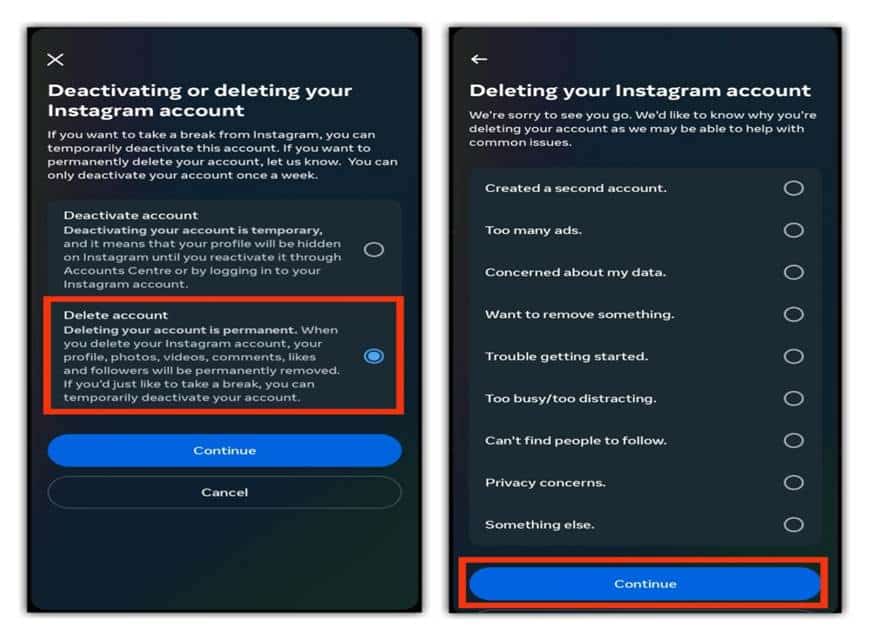
You can delete your account by going directly to Accounts ownership and control settings in the Accounts Centre. Or you can follow these instructions:

  • Tap your profile picture in the bottom right to go to your profile.
  • Tap three horizontal lines in the top right corner.
  • Tap Accounts Centre, then tap Personal Details.
  • Tap Account Ownership and Control, then tap Deactivation or Deletion.
  • Tap the account that you’d like to permanently delete.
  • Tap Delete account, then tap Continue.

How To Permanently Delete or Deactivate Your Instagram Account On Your Mobile Browser?

If you are unable to access your account on your mobile app, then you can also do the same through your mobile browser by following these simple steps.

  • Tap settings at the top.
  • Tap Accounts Centre, then tap Personal Details.
  • Tap Account Ownership and Control, then tap Deactivation or Deletion.
  • Tap the account that you’d like to permanently delete.
  • Tap Delete account, then tap Continue.

As per Instagram policy, after 30 days of your account deletion request, your account and all your information will be permanently deleted, and you won’t be able to retrieve your information.

While the same may opt for this in case of social media detox, for some deactivating or deleting an account may come in handy in case it has been hacked or your smartphone has been misplaced. To secure your data, you may choose to temporarily deactivate it.

Also Check: PUBG Hacks: How To Increase FPS In PUBG Mobile

Found this useful?

Share it with your friends

See more TechInformer stories on Google

Add us as a preferred source and our stories will show up more often in your Top Stories.

Add TechInformer as a preferred source on Google


WhatsAppLinkedInXFacebookEmail
Tags: Deactivate Your InstagramInstagram

Related Posts

Display over other apps permission screen on an Android phone
How To

Display Over Other Apps: How to Check It and Stop UPI Fraud

November 23, 2026
Aadhaar Seva Kendra centre for Aadhaar address update
How To

How to Update Aadhaar Address Online on myAadhaar

November 23, 2026
Census 2027 self enumeration form online
How To

Census 2027 Self-Enumeration: How to Fill the Form Online

November 21, 2026
A mobile phone tower in Ladakh, India
Telecom

TRAI Network Anubhav: Check Network Speed in Your Area

November 20, 2026
Traffic policeman on duty at a busy Indian road junction
Security

Fake E-Challan Scam: How to Check if a Traffic Challan Is Real

November 18, 2026
Person looking at a smartphone screen in the dark, representing checking a phone for spyware
Security

How to Check if Your Phone Is Hacked or Has Spyware

November 17, 2026
Next Post
Forgot Your IRCTC Password? Here Is How To Reset Your Account Password Online

Forgot Your IRCTC Password? Here Is How To Reset Your Account Password Online

Popular

how to check SIM cards in your name: a selection of mobile SIM cards

How to Check How Many SIM Cards Are in Your Name

October 27, 2026
Meta’ Ray-Ban Smart Glasses To Add Display For Notifications

Meta’ Ray-Ban Smart Glasses To Add Display For Notifications

December 24, 2024
Apple To Unveil Latest Products Next Week: M4 MacBook Pro, M4 iMac & More

Apple To Unveil Latest Products Next Week: M4 MacBook Pro, M4 iMac & More

October 25, 2024
Instagram Down Today, Users Express Their Disappointment

Instagram Down Today, Users Express Their Disappointment

November 19, 2024
GTA 5 To Get A Free Upgrade On PC Next Month: Better Graphics, GTA+ Membership & More

GTA 5 To Get A Free Upgrade On PC Next Month: Better Graphics, GTA+ Membership & More

February 21, 2025
Apple AirPods 4 With Active Noise Cancellation

Apple AirPods 4 With Active Noise Cancellation, H2 Chipset Launched In India

September 18, 2024
Facebook Instagram Twitter LinkedIn Youtube

About Tech Informer

Focused on keeping new-age audiences informed about the ever-evolving world of technology, Tech Informer is the one-stop destination if you enjoy reading about the ongoing developments in the Tech world.

Navigation

  • Latest
  • AI
  • Smartphones
  • Gadgets
  • Apps
  • Telecom
  • Startups
  • Security
  • Gaming
  • Reviews
  • How To

Information

  • About Us
  • Contact Us
  • Privacy Policy

©2026 Copyright Tech Informer. RVCJ Digital Media Pvt Ltd

TechInformer

Tech news, smartphones, AI and gadgets in India, explained simply.

Topics

  • Latest
  • AI
  • Smartphones
  • Gadgets
  • Apps
  • Telecom
  • Startups
  • Security
  • Gaming
  • Reviews
  • How To

Company

  • About us
  • Contact us
  • Privacy policy
  • Advertise with us

Follow us on Google

Add TechInformer as a preferred source and see our stories more often in Top Stories.

Add as preferred source

© 2026 Tech Informer. RVCJ Digital Media Pvt Ltd.

Latest news · Sitemap

TECHINFORMER
As an Amazon Associate, we earn from qualifying purchases.
No Result
View All Result
  • Latest
  • AI
  • Smartphones
  • Gadgets
  • Apps
  • Telecom
  • Startups
  • Security
  • Gaming
  • Reviews
  • How To

©2026 Copyright Tech Informer. RVCJ Digital Media Pvt Ltd