
TechInformer
Follow on Google
  • Latest
  • AI
  • Smartphones
  • Gadgets
  • Apps
  • Telecom
  • Startups
  • Security
  • Gaming
  • Reviews
  • How To
No Result
View All Result
  • Latest
  • AI
  • Smartphones
  • Gadgets
  • Apps
  • Telecom
  • Startups
  • Security
  • Gaming
  • Reviews
  • How To
No Result
View All Result
TechInformer
No Result
View All Result
Home Apps

How to Permanently Delete or Deactivate Your Instagram Account

by TechInformer Desk
September 4, 2024
in Apps, How To
Reading Time: 2 mins read
A A
How to Permanently Delete or Deactivate Your Instagram Account
2 min readAdd TechInformer as a preferred source on Google

Instagram has become a very integral part of our day-to-day lives with over 2.4 billion users globally today. It started as a platform to connect with your friends and family through pictures and videos, but today it is used for that and so much more.

From marketing and promotions to becoming a social media influencer, Instagram has been a part of it all. But the app has its way of keeping people hooked. The addiction becomes so intense that people look for different ways to detox. And the best way to do this is by either deleting it or temporarily deactivating your account.

iOS 27 Update in India: Supported iPhones and New FeaturesAlso readiOS 27 Update in India: Supported iPhones and New Features

How To Permanently Delete or Deactivate Your Instagram Account On Your Mobile App?

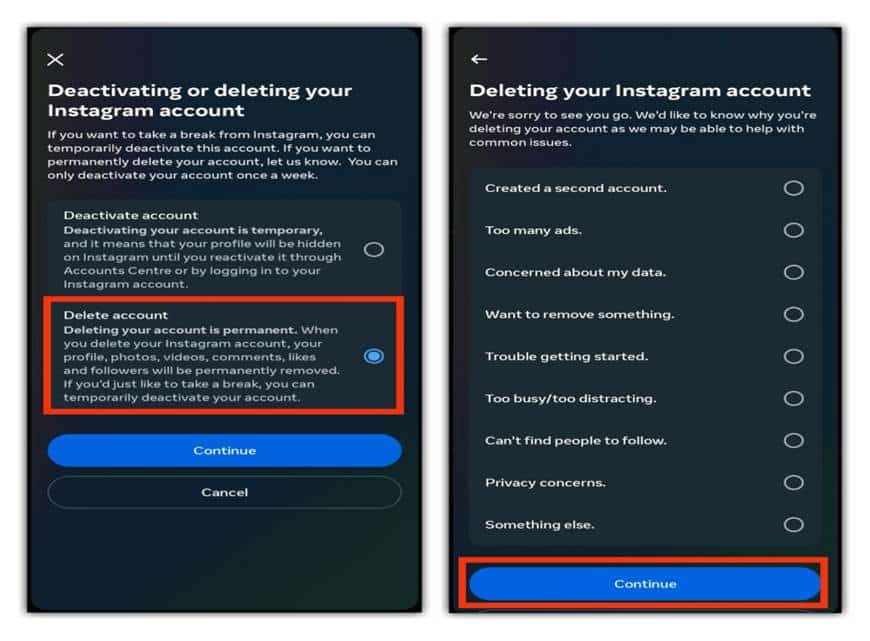
You can delete your account by going directly to Accounts ownership and control settings in the Accounts Centre. Or you can follow these instructions:

  • Tap your profile picture in the bottom right to go to your profile.
  • Tap three horizontal lines in the top right corner.
  • Tap Accounts Centre, then tap Personal Details.
  • Tap Account Ownership and Control, then tap Deactivation or Deletion.
  • Tap the account that you’d like to permanently delete.
  • Tap Delete account, then tap Continue.

How To Permanently Delete or Deactivate Your Instagram Account On Your Mobile Browser?

If you are unable to access your account on your mobile app, then you can also do the same through your mobile browser by following these simple steps.

  • Tap settings at the top.
  • Tap Accounts Centre, then tap Personal Details.
  • Tap Account Ownership and Control, then tap Deactivation or Deletion.
  • Tap the account that you’d like to permanently delete.
  • Tap Delete account, then tap Continue.

As per Instagram policy, after 30 days of your account deletion request, your account and all your information will be permanently deleted, and you won’t be able to retrieve your information.

While the same may opt for this in case of social media detox, for some deactivating or deleting an account may come in handy in case it has been hacked or your smartphone has been misplaced. To secure your data, you may choose to temporarily deactivate it.

Also Check: PUBG Hacks: How To Increase FPS In PUBG Mobile

Found this useful?

Share it with your friends

See more TechInformer stories on Google

Add us as a preferred source and our stories will show up more often in your Top Stories.

Add TechInformer as a preferred source on Google
WhatsAppLinkedInXFacebookEmail
Tags: Deactivate Your InstagramInstagram

Related Posts

Aadhaar card held next to a smartphone
How To

How To Update Aadhaar Email And Mobile In The New App

October 13, 2026
An iPhone showing the home screen, illustrating the iOS 27 update
Apps

iOS 27 Update in India: Supported iPhones and New Features

October 13, 2026
OnePlus Android 16 Beta 2 Update Reportedly Adds Custom Battery Charging Limit Feature
Smartphones

OnePlus Android 16 Beta 2 Update Reportedly Adds Custom Battery Charging Limit Feature

April 14, 2025
Apple Rolls Out iOS 18.4 Update, Bringing Apple Intelligence Features To India
AI

Apple Rolls Out iOS 18.4 Update, Bringing Apple Intelligence Features To India

April 2, 2025
Apple’s Foldable iPhone May Offer iPad-Like Display Aspect Ratio & Support iPad Apps, Tipster Says
Smartphones

Apple’s Foldable iPhone May Offer iPad-Like Display Aspect Ratio & Support iPad Apps, Tipster Says

April 2, 2025
Apple To Host Worldwide Developers Conference 2025 From June 9
Apps

Apple To Host Worldwide Developers Conference 2025 From June 9

March 26, 2025
Next Post
Forgot Your IRCTC Password? Here Is How To Reset Your Account Password Online

Forgot Your IRCTC Password? Here Is How To Reset Your Account Password Online

Popular

Volvo EX90 electric SUV launched in India at Rs 1.26 crore ex-showroom

Volvo EX90 India Price Rs 1.26 Crore: Range, Specs, Rivals

October 13, 2026
Apple Begins Manufacturing iPhone 16 In India, Plans to Open Four New Stores Across Major Cities

Apple Begins Manufacturing iPhone 16 In India, Plans To Open Four New Stores Across Major Cities

October 4, 2024
Google Rolls Out New Theft Protection Features For Android To Safeguard User Data

Google Rolls Out New Theft Protection Features For Android To Safeguard User Data

October 7, 2024
Amazon Introduces AI-Powered ‘X-Ray Recaps’ Feature On Prime Video To Provide Spoiler-Free Summaries Of Shows

Amazon Introduces AI-Powered ‘X-Ray Recaps’ Feature On Prime Video To Provide Spoiler-Free Summaries Of Shows

November 5, 2024
OpenAI Accuses DeepSeek Of Distilling Its API To Build R1 Model

OpenAI Accuses DeepSeek Of Distilling Its API To Build R1 Model

January 30, 2025
How To Use Dual WhatsApp Accounts On The Same Phone

How To Freeze Last Seen On WhatsApp

September 3, 2024
Facebook Instagram Twitter LinkedIn Youtube

About Tech Informer

Focused on keeping new-age audiences informed about the ever-evolving world of technology, Tech Informer is the one-stop destination if you enjoy reading about the ongoing developments in the Tech world.

Navigation

  • Latest
  • AI
  • Smartphones
  • Gadgets
  • Apps
  • Telecom
  • Startups
  • Security
  • Gaming
  • Reviews
  • How To

Information

  • About Us
  • Contact Us
  • Privacy Policy

©2026 Copyright Tech Informer. RVCJ Digital Media Pvt Ltd

TechInformer

Tech news, smartphones, AI and gadgets in India, explained simply.

Topics

  • Latest
  • AI
  • Smartphones
  • Gadgets
  • Apps
  • Telecom
  • Startups
  • Security
  • Gaming
  • Reviews
  • How To

Company

  • About us
  • Contact us
  • Privacy policy
  • Advertise with us

Follow us on Google

Add TechInformer as a preferred source and see our stories more often in Top Stories.

Add as preferred source

© 2026 Tech Informer. RVCJ Digital Media Pvt Ltd.

Latest news · Sitemap

TECHINFORMER
No Result
View All Result
  • Latest
  • AI
  • Smartphones
  • Gadgets
  • Apps
  • Telecom
  • Startups
  • Security
  • Gaming
  • Reviews
  • How To

©2026 Copyright Tech Informer. RVCJ Digital Media Pvt Ltd