TechInformer
Follow on Google
  • Latest
  • AI
  • Smartphones
  • Gadgets
  • Apps
  • Telecom
  • Startups
  • Security
  • Gaming
  • Reviews
  • How To
No Result
View All Result
  • Latest
  • AI
  • Smartphones
  • Gadgets
  • Apps
  • Telecom
  • Startups
  • Security
  • Gaming
  • Reviews
  • How To
No Result
View All Result
TechInformer
No Result
View All Result
Home Apps

Android 16 To Completely Redesign The Notifications And Quick Settings Panel

by TechInformer Desk
September 18, 2024
in Apps, Android
Reading Time: 2 mins read
A A
2 min readAdd TechInformer as a preferred source on Google

Google is yet to release the Android 15 software update for its smartphone. The tech company released the source code for Android 15 recently for the developers to have a sneak peek into what’s to be expected.

While some of the features are going to change the functioning a little, there are still some features that Google has been working on which will be released with the Android 16 update which is expected to roll out by next year only.

Android 16 To Completely Redesign The Notifications And Quick Settings Panel

iOS 27 Update in India: Supported iPhones and New FeaturesAlso readiOS 27 Update in India: Supported iPhones and New Features
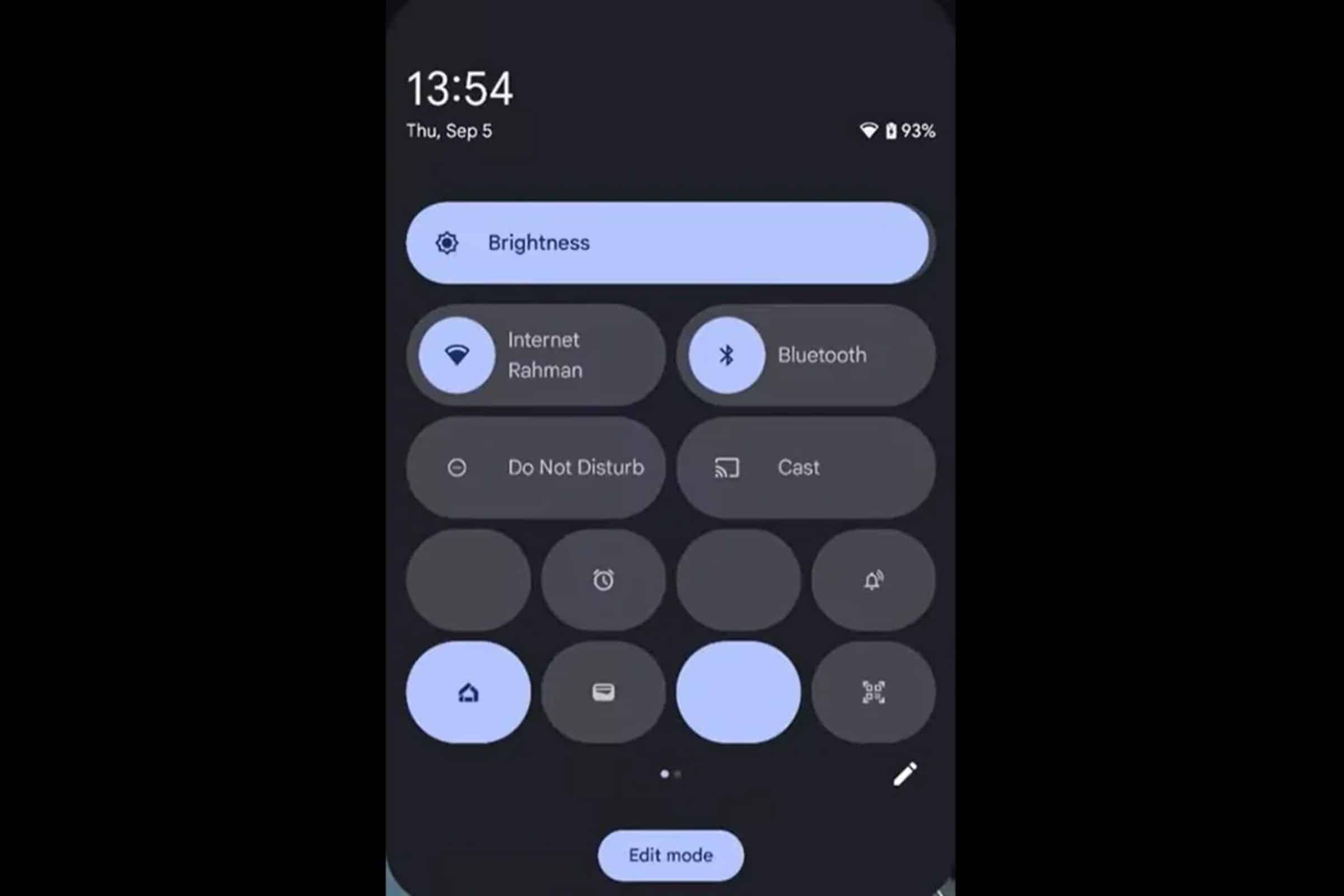
The list of changes to be launched with Android 16 are quite a few but the one most talked about is the complete redesigning of Android’s notification and Quick Settings panels.

In the current layout, the notification and quick settings panels can be accessed by pulling down the status bar. If you pull it down again it shows the entire Quick Settings panel along with some notifications.

But the recent update which is expected to be launched with Android 16 has a slight change. Here are some of the changes as seen in the Android 15 QPR beta version.
Android 16 To Completely Redesign The Notifications And Quick Settings Panel

  • The notifications panel now covers a quarter of the screen and not the entire screen as it does in the current design.
  • While you can still view your notifications once the status bar is pulled down, you can no longer access the Quick settings panel.
  • Since the status bar covers only a quarter of the screen, you can still see the app you were using in the bottom half of the screen.
  • To access the Quick Settings panel, you need to pull down the status bar with two fingers and you can then swipe left or right between pages to see all your tiles. 
  • The brightness bar will still appear at the top but will have a text label. It will display the brightness level as you adjust it.

These changes are not yet the final ones and the tech giant may still choose to recall them or not launch them with the final version. It is too early as to what will be included in the Android 16 version.

Also Checkout – Samsung Developing Smart Glasses in Collaboration With Google

Found this useful?

Share it with your friends

See more TechInformer stories on Google

Add us as a preferred source and our stories will show up more often in your Top Stories.

Add TechInformer as a preferred source on Google

WhatsAppLinkedInXFacebookEmail
Tags: AndroidAndroid 16

Related Posts

An iPhone showing the home screen, illustrating the iOS 27 update
Apps

iOS 27 Update in India: Supported iPhones and New Features

October 13, 2026
OnePlus Android 16 Beta 2 Update Reportedly Adds Custom Battery Charging Limit Feature
Smartphones

OnePlus Android 16 Beta 2 Update Reportedly Adds Custom Battery Charging Limit Feature

April 14, 2025
Apple Rolls Out iOS 18.4 Update, Bringing Apple Intelligence Features To India
AI

Apple Rolls Out iOS 18.4 Update, Bringing Apple Intelligence Features To India

April 2, 2025
Apple’s Foldable iPhone May Offer iPad-Like Display Aspect Ratio & Support iPad Apps, Tipster Says
Smartphones

Apple’s Foldable iPhone May Offer iPad-Like Display Aspect Ratio & Support iPad Apps, Tipster Says

April 2, 2025
Apple To Host Worldwide Developers Conference 2025 From June 9
Apps

Apple To Host Worldwide Developers Conference 2025 From June 9

March 26, 2025
Google Is Introducing New Feature to Google Vids’ ‘Help Me Create’
Apps

Google Is Introducing New Feature to Google Vids’ ‘Help Me Create’

March 25, 2025
Next Post
HMD Fusion With Modular Design Announced

HMD Fusion With Modular Design Announced

Popular

Instagram Rolls Out Three New Features For Broadcast Channels To Boost Creator-Audience Engagement

Instagram Rolls Out Three New Features For Broadcast Channels To Boost Creator-Audience Engagement

December 6, 2024
Rainbow Six Siege Set For Major Transformation: New Operator, Tactical Upgrades & More

Rainbow Six Siege Set For Major Transformation: New Operator, Tactical Upgrades & More

February 18, 2025
Prevent Your SmartPhone From Overheating

5 Ways To Prevent Your SmartPhone From Overheating In Summer

September 3, 2024
How To Download The PUBG Mobile 3.5 Beta & Explore New Features

How To Download PUBG Mobile 3.5 Beta & Explore Its New Features

October 11, 2024
5 Emergency iPhone Features You Should Know About

5 Emergency iPhone Features You Should Know About

September 3, 2024
Users Can Now Access ChatGPT Via WhatsApp & Phone Calls

Users Can Now Access ChatGPT Via WhatsApp & Phone Calls

December 19, 2024
Facebook Instagram Twitter LinkedIn Youtube

About Tech Informer

Focused on keeping new-age audiences informed about the ever-evolving world of technology, Tech Informer is the one-stop destination if you enjoy reading about the ongoing developments in the Tech world.

Navigation

  • Latest
  • AI
  • Smartphones
  • Gadgets
  • Apps
  • Telecom
  • Startups
  • Security
  • Gaming
  • Reviews
  • How To

Information

  • About Us
  • Contact Us
  • Privacy Policy

©2026 Copyright Tech Informer. RVCJ Digital Media Pvt Ltd

TechInformer

Tech news, smartphones, AI and gadgets in India, explained simply.

Topics

  • Latest
  • AI
  • Smartphones
  • Gadgets
  • Apps
  • Telecom
  • Startups
  • Security
  • Gaming
  • Reviews
  • How To

Company

  • About us
  • Contact us
  • Privacy policy
  • Advertise with us

Follow us on Google

Add TechInformer as a preferred source and see our stories more often in Top Stories.

Add as preferred source

© 2026 Tech Informer. RVCJ Digital Media Pvt Ltd.

Latest news · Sitemap

TECHINFORMER
No Result
View All Result
  • Latest
  • AI
  • Smartphones
  • Gadgets
  • Apps
  • Telecom
  • Startups
  • Security
  • Gaming
  • Reviews
  • How To

©2026 Copyright Tech Informer. RVCJ Digital Media Pvt Ltd