
Key takeaways
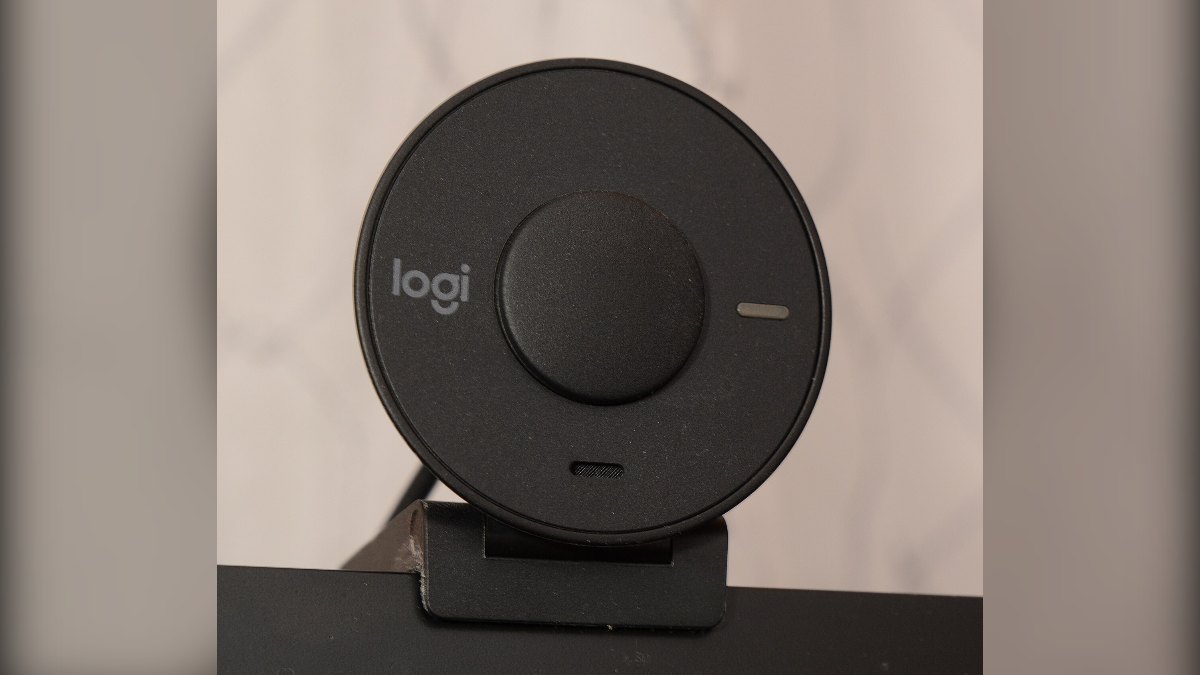
- Logitech Brio 100 is the best balance of 1080p video, light correction and a privacy shutter.
- Lenovo 300 FHD has the widest 95-degree view for group calls.
- HP 320 FHD is the cheapest 1080p pick, listed at Rs 2,299 on HP's India store.
- Logitech C270 and C310 are 720p options for students and basic calls.
- All five are USB-A and plug-and-play with Zoom, Meet and Teams.
Online classes, Teams calls and family video calls during Diwali all look better with a proper webcam than a 720p laptop camera. This November 2026 guide covers the best webcams under Rs 5,000 in India, with five models from Logitech, Lenovo and HP that are sold on Amazon India, and who each one suits.
All of them are plug-and-play over USB and work with Zoom, Google Meet and Microsoft Teams on Windows and macOS without extra drivers.
Quick comparison
| Webcam | Resolution | Field of view | Privacy shutter | Best for |
|---|---|---|---|---|
| Logitech Brio 100 | 1080p | 58 degrees | Built-in | Work calls, best balance |
| Lenovo 300 FHD | 1080p | 95 degrees | Built-in | Group calls, wide view |
| HP 320 FHD | 1080p, 30 fps | 66 degrees | Attachable cap | Budget Full HD |
| Logitech C310 | 720p, 30 fps | 60 degrees | No | Students, basic calls |
| Logitech C270 | 720p, 30 fps | 55 degrees | No | Lowest cost from a big brand |
Best webcams under Rs 5,000 in India
1. Logitech Brio 100
The Brio 100 is the pick for most home-office users. You get 1080p video, Logitech’s RightLight auto-light balance for dim rooms and a sliding privacy shutter. Retail listings show an MRP of Rs 4,850.
 Also readBest Gaming Mouse Under Rs 2,000 in India (November 2026)
- Resolution: 1080p, 2 MP sensor
- Field of view: 58 degrees diagonal, fixed focus
- Built-in mic with about 1 m range
- USB-A, 1.5 m cable, works with Windows, macOS and ChromeOS
Drawback: Fixed focus, so holding a document close to the lens will look soft.
2. Lenovo 300 FHD Webcam
The Lenovo 300 has the widest view here at 95 degrees, so it fits two or three people on a family call or a small meeting table. It has two built-in mics and a physical shutter. Its MRP is Rs 5,385, but Lenovo’s own store listed it at Rs 3,311 at the time of writing.
- Resolution: Full HD 1080p
- Field of view: 95 degrees diagonal
- Dual built-in microphones
- USB-A, privacy shutter
Drawback: The wide angle shows more of your room, so a messy background is harder to hide.
3. HP 320 FHD Webcam
The HP 320 is the cheapest Full HD option from a major brand on this list. HP’s India store listed it at Rs 2,299. It records 1080p at 30 fps with a 66-degree view, which suits a single person at a desk.
- Resolution: 1920 x 1080 at 30 fps
- Field of view: 66 degrees diagonal
- Single built-in mic
- USB-A, attachable privacy cap
Drawback: The privacy cover is a separate cap, which is easy to lose.
4. Logitech C310 HD
The C310 is a 720p webcam that does the basics well: RightLight 2 light correction, a noise-reducing mic that picks up your voice from 1.5 metres and a universal clip. It is a good fit for school and college online classes.
- Resolution: 720p at 30 fps
- Field of view: 60 degrees diagonal
- Mono noise-reducing mic, up to 1.5 m
- Universal clip for monitor or laptop
Drawback: Only 720p, and no privacy shutter.
5. Logitech C270 HD
The C270 has been around for years and is still the cheapest Logitech webcam in India, with a retail MRP of Rs 2,595. If your laptop camera is broken or you use a desktop with no camera, it is a reliable fix.
- Resolution: 720p at 30 fps
- Field of view: 55 degrees diagonal
- Mono noise-reducing mic, up to 1.5 m
- RightLight 2 auto light correction
Drawback: The narrow 55-degree view and 720p resolution look dated next to the 1080p models.
How to choose a webcam
- 1080p vs 720p: Zoom and Meet often compress video, but 1080p still looks sharper on Teams and in recordings. Pick 720p only if the budget is tight.
- Field of view: 55-66 degrees is right for one person. Go wider (90 degrees or more) for group calls.
- Light correction: Most Indian homes have overhead tube lights or a window behind the desk. Auto-light features like RightLight help a lot here.
- Privacy shutter: A built-in shutter is more convenient than a separate cap.
- Port: All five use USB-A. If your laptop only has USB-C, budget for an adapter.
Tips to look better on video calls
Place the webcam at eye level, on top of the monitor or on a stack of books behind the laptop. A camera that looks up at you from below is the most common reason people look bad on calls, and no webcam fixes that.
Face the light source. A window or lamp in front of you, not behind you, makes a Rs 2,000 webcam look better than an expensive one in a dark room. If you sit with a window at your back, close the curtain during calls.
In Zoom, Meet and Teams, open video settings and pick the external webcam by name, as apps often keep using the built-in laptop camera. Also choose the right mic under audio settings, and run a test call before an important meeting or interview.
Which one should you buy
Buy the Logitech Brio 100 for daily work calls. Choose the Lenovo 300 FHD if more than one person sits in frame. Pick the HP 320 for Full HD at the lowest cost, and the Logitech C270 or C310 for students who need a simple, dependable camera.
Setting up a home desk? Read our list of work-from-home essentials, the best laptops under Rs 80,000 for productivity and these Windows 11 keyboard shortcuts.
Frequently asked questions
Is a 1080p webcam worth it over 720p?
Yes, for work calls and recordings. 1080p looks sharper on Teams and Meet, and costs only a little more than 720p models today.
Do these webcams work with a Mac?
Yes. The Logitech, Lenovo and HP models here are plug-and-play over USB with macOS. You need a USB-C adapter on newer MacBooks.
Which webcam is best for online classes under Rs 5,000?
The Logitech C310 or C270 is enough for most students. For better video, the HP 320 FHD gives 1080p at a low price.
Does a webcam microphone replace a headset?
For short calls in a quiet room, yes. In a noisy home, a wired or Bluetooth headset gives clearer voice than any built-in webcam mic.
See more TechInformer stories on Google
Add us as a preferred source and our stories will show up more often in your Top Stories.
Add TechInformer as a preferred source on Google