
Social icon element need JNews Essential plugin to be activated.
TechInformer
Follow on Google
  • Latest
  • AI
  • Smartphones
  • Gadgets
  • Apps
  • Telecom
  • Startups
  • Security
  • Gaming
  • Reviews
  • How To
No Result
View All Result
  • Latest
  • AI
  • Smartphones
  • Gadgets
  • Apps
  • Telecom
  • Startups
  • Security
  • Gaming
  • Reviews
  • How To
No Result
View All Result
TechInformer
No Result
View All Result
Home Apps

WhatsApp Introduces New ‘Voice Message Transcripts’ Feature To Transcribe Voice Messages Into Text

by TechInformer Desk
November 22, 2024
in Apps, Feature Update, News
Reading Time: 2 mins read
A A
WhatsApp Introduces New ‘Voice Message Transcripts’ Feature To Transcribe Voice Messages Into Text
2 min readAdd TechInformer as a preferred source on Google

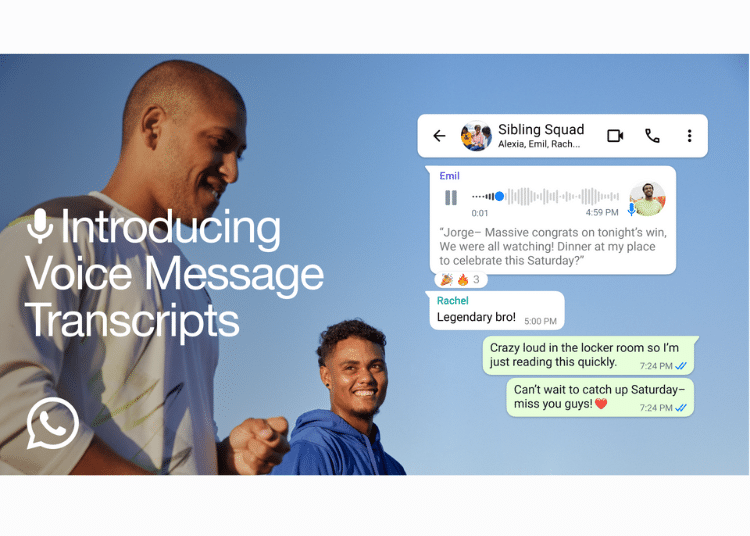
It often happens to all of us that we receive a voice message from friends or family while we’re in a loud place or traveling, making it difficult to listen to the message. To address this issue, WhatsApp has introduced a new feature, ‘voice message transcripts’. 

This feature transcribes voice messages into text to help the users keep up with the conversation no matter where they are or what they are doing. 

According to the company’s blog post, transcripts are generated on your device so that no one else, not even WhatsApp, can hear or read your personal messages. This means the communication is end-to-end encrypted. 

iOS 27 Update in India: Supported iPhones and New FeaturesAlso readiOS 27 Update in India: Supported iPhones and New Features

Currently, it supports English, Portuguese, Spanish, and Russian on Android. On iOS, it also supports Arabic, Chinese, French, German, Italian, Japanese, Norwegian, Thai, Turkish, and Swedish, in addition to English, Portuguese, Spanish, and Russian.

How To Use This Feature

By following these simple instructions, you can turn on this feature.  

Step 1: Open WhatsApp Settings.

Step 2: Tap Chats.

Step 3: Turn on Voice Message Transcripts and select your Transcript language.

Step 4: Tap and hold a voice message, then tap Transcribe.

Step 5: Tap the expand icon in the voice message to expand the transcription. 

As per the blog post, transcripts are rolling out globally over the coming weeks. The company says that if users receive a ‘Transcript unavailable error, it might be because the transcript language setting doesn’t match the language of the voice message, some words aren’t recognised, or the voice message language isn’t supported.

Found this useful?

Share it with your friends

See more TechInformer stories on Google

Add us as a preferred source and our stories will show up more often in your Top Stories.

Add TechInformer as a preferred source on Google
WhatsAppLinkedInXFacebookEmail
Tags: Androidend-to-end encryptioniOSTranscribeVoice Message TranscriptsWhatsApp
Next Post
Tecno Pop 9 4G Launched In India: Key Specifications, Price & Availability

Tecno Pop 9 4G Launched In India: Key Specifications, Price & Availability

Social icon element need JNews Essential plugin to be activated.

Navigation

  • Latest
  • AI
  • Smartphones
  • Gadgets
  • Apps
  • Telecom
  • Startups
  • Security
  • Gaming
  • Reviews
  • How To

Information

  • About Us
  • Contact Us
  • Privacy Policy

©2026 Copyright Tech Informer. RVCJ Digital Media Pvt Ltd

TechInformer

Tech news, smartphones, AI and gadgets in India, explained simply.

Topics

  • Latest
  • AI
  • Smartphones
  • Gadgets
  • Apps
  • Telecom
  • Startups
  • Security
  • Gaming
  • Reviews
  • How To

Company

  • About us
  • Contact us
  • Privacy policy
  • Advertise with us

Follow us on Google

Add TechInformer as a preferred source and see our stories more often in Top Stories.

Add as preferred source

© 2026 Tech Informer. RVCJ Digital Media Pvt Ltd.

Latest news · Sitemap

TECHINFORMER
As an Amazon Associate, we earn from qualifying purchases.
No Result
View All Result
  • Latest
  • AI
  • Smartphones
  • Gadgets
  • Apps
  • Telecom
  • Startups
  • Security
  • Gaming
  • Reviews
  • How To

©2026 Copyright Tech Informer. RVCJ Digital Media Pvt Ltd